
The passage tooltip
This is what your visitors get. It works with a mouse, a touch screen and a keyboard.
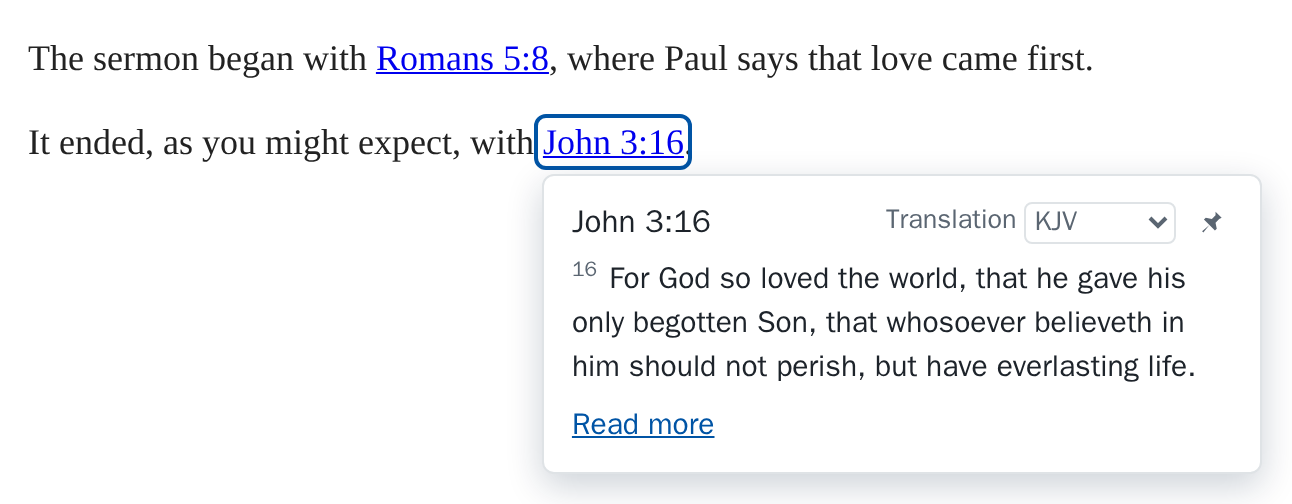
Opening and closing
- Mouse: it opens when the pointer rests on a link (after 300 ms, which you can change) and closes when the pointer leaves.
- Touch: the first tap opens the tooltip instead of following the link. Read more is the way on.
- Keyboard: it opens when the link takes the focus, and Esc closes it.
The link being looked at is outlined. To restyle the outline, style a.st-ref[aria-expanded="true"] in your own CSS.
What it shows
- A translation menu. A visitor's choice is kept for that link in their own browser, so it is the same on their next visit. See the translation passages open in.
- A pin (“Keep open”), which keeps the tooltip open while the visitor writes a comment or reads on. Any number can be pinned: other passages open their own tooltips. Clicking it again, or Esc, lets that one go.
- The passage, up to 12 verses. A longer one ends with “…”. When it is taller than the tooltip it scrolls inside it, while the heading, the menu, the pin and Read more stay in view.
- The credit the translation's publisher asks for, with its links.
- Read more, which opens the passage where your links go.
With the browser extension
A visitor who has the Scripture Tips extension sees one tooltip per link on your site, not two: your links show yours.